eBPF/XDP and DPDK : how to boost network instances !
I hope (😜) you have read my article explaining the concepts of Geneve tunneling on AWS GWLB (Gateway Load-Balancer), detailing how I wrote a simple Geneve Router in Python which can be used to test AWS GWLB without running dedicated (and costly) appliances.
It was helpful to understand the basics of how Geneve encapsulation works and run a simple GWLB deployment, but clearly, the performance is not there, and using a user-space process (and even more with an interpreted language as Python) without any specific tuning is a huge limitation, and you’ll not be able to run any high-bandwidth tasks with this. While we (network engineers) sometimes focus on scale of backbone networks, interconnection links, etc, that’s also very interesting to understand how network appliances (now running on virtual instances) are able to deal with the amount of traffic we manage nowadays, changing our mind from macro to micro view.
And this is not a small detail : a lot of workloads move to the cloud, more and more traffic has to go through software appliances running on virtual instances (firewalls, IDS/IPS, traffic capture, tunnel endpoints…). We don’t have it available as hardware box / bare metal to handle that anymore, so making an operating system able to move packets fast, at the line rate of the attached network cards is now a requirement.
So how to boost those performances and have projects similar to my Geneve router able to deal with high-bandwidth requirements ? We’ll have to take a step ahead from our “simple” Python code, and look at the “core” of the Linux kernel way of working. We need to eliminate / optimize as much as possible all the “middle” steps : every time a packet has to jump from the network card (NIC) to a user-land process, we have to go through a huge bunch of CPU cycles and memory copies. If we want to handle 1, 10, or more Gbps, we can’t accept that.
Let’s try to figure out some numbers. We, networking people, love to reason in the worst case : the smallest possible Ethernet frame. On the wire a 64-byte frame is in fact 84 bytes (7-byte preamble, 1-byte start-of-frame delimiter, and 12-byte inter-frame gap), so 84x8 = 672 bits. If we divide the link rate by that we get the theoretical packet rate :
- 1 Gbps → 1 000 000 000 / 672 ~ 1.49 million packets per second (Mpps)
- 10 Gbps → ~ 14.9 Mpps
- 100 Gbps → ~ 149 Mpps
Now here’s the “basic” logic of how a network card talks to a CPU : one packet arrives, the card triggers one hardware interrupt (hardIRQ) to ask the kernel to get and process it for each and every received packet. So at 10 Gbps of small packets, that’s ~15 million interrupts per second. Each interrupt costs a few microseconds of context-switching (save the current registers values, jump to the hardware interrupt-handler, restore, resume).
Some math again : even at an optimistic 1 µs per interrupt, 15 million of interrupts would need 15 seconds of CPU time to cover 1 second of traffic. The machine can’t even manage the “announcement” of the received packets to the kernel, not yet even thinking about what do you with the actual payload. This is an interrupt storm, and it will overload the machine immediately.
Keep in mind those number of packets, as this is the core of this article. The problem not being the packet size, but their amount and the cost of receiving and processing each of those. All the technologies we’ll talk about (NAPI, BPF, eBPF/XDP, DPDK) are just different ways to avoid / reduce this cost per packet.
We’ll start the basic way, when a frame arrives on the NIC and the card triggers the CPU with an HardIRQ, and we’ll follow that packet up the “standard” Linux network stack, to understand the time-consuming steps. Then we’ll see how the kernel developers worked around the problem, step by step : first by changing the way the card announces its packets (NAPI), then by allowing us to push our own filtering code inside the kernel, instead of copying all the traffic to a user-land process. This is something you probably use everyday without even being aware : this is where the famous BPF comes from, and the reason why tcpdump doesn’t kills your machine when you capture on a very busy interface.
Then we’ll discuss how BPF evolved to eBPF, and how XDP permits to work on a packet before the kernel starts to do anything with it. And the final point : DPDK, which goes much further : “detach” the NIC from the kernel, and let a user-land process talk to it directly.
And this is not just theory : it’s what almost all the networking instances we deploy on the cloud are using today. The virtual firewalls, routers and load-balancers you launch from a marketplace (Palo Alto VM-Series, FortiGate-VM, Cisco Catalyst 8000V, vSRX, F5, and many others) are all running a DPDK-based dataplane under the hood, and the big software load-balancers and WAF (like Cloudflare’s or Meta’s) are built on eBPF/XDP.
Let’s start our journey in the life of a packet !
The brute approach : HardIRQ
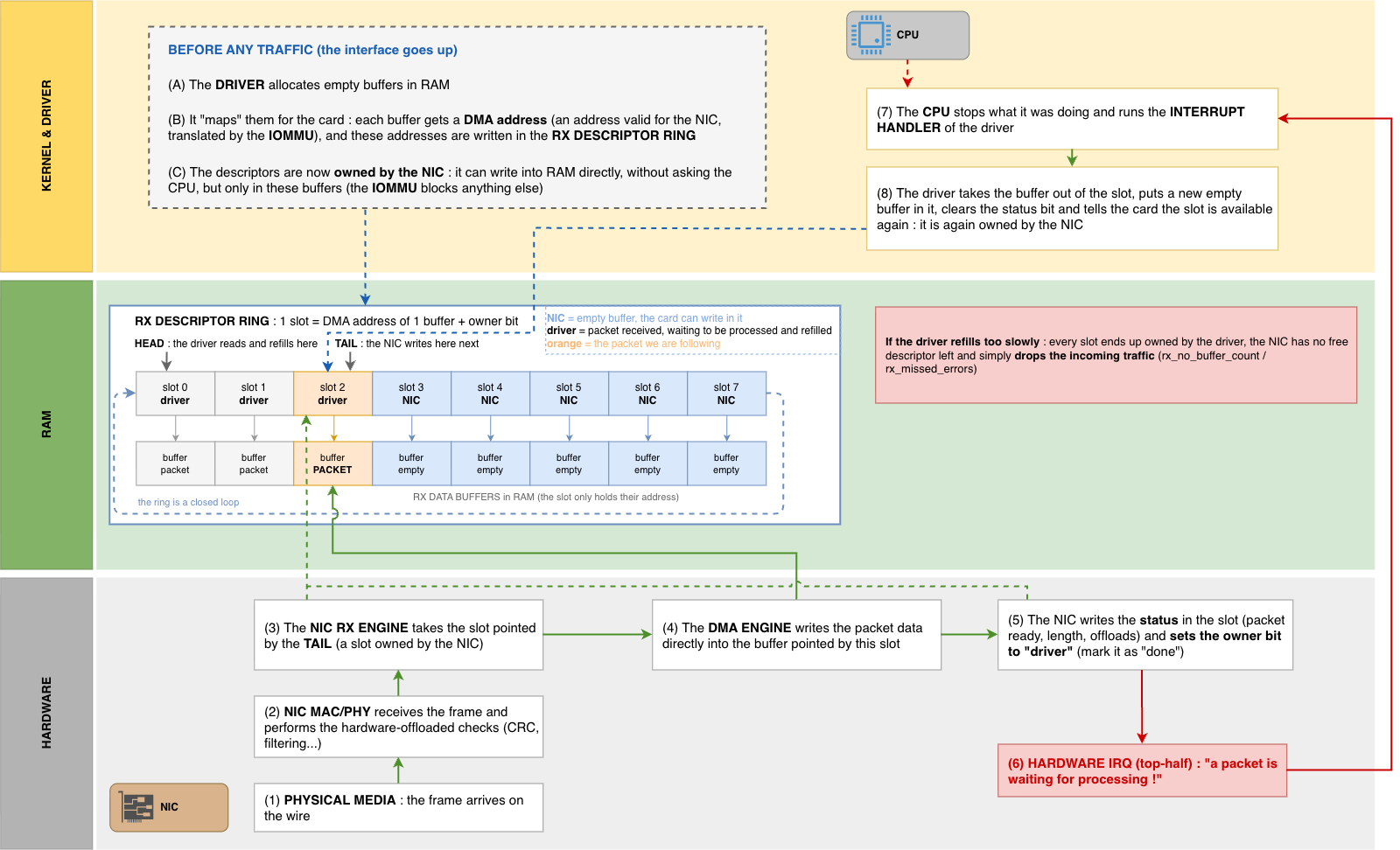
When a frame arrives at the NIC, the hardware performs a few basic checks which are generally offloaded (like the CRC, to ensure the data isn’t corrupted). But the NIC doesn’t have a lot of storage. It needs to move that data to the system RAM immediately.
Some time ago, the CPU had to manually move data from the NIC’s internal buffer to RAM for each and every packet. Today, we use DMA (Direct Memory Access). The NIC has a map of “descriptors” (pointers to memory locations in RAM) called the RX Ring Buffer. It writes the packet data directly into RAM without sollicitating the CPU for this operation.
One thing to know here : these descriptors are prepared before any packet arrives. When the interface goes up, the driver reserves a bunch of empty buffers in RAM, gives their addresses to the DMA controller of the card, and populates the ring slots with them. From this moment the NIC owns these descriptors, and it can write packets in RAM alone, whenever it wants, without asking anything to the CPU. Each time a packet is copied into a buffer slot, the driver has to put a new empty buffer in the ring. If it’s too slow, the NIC has no descriptor left and just drops the traffic (it can be seen in the rx_no_buffer_count or rx_missed_errors counters of the ethtool -S command output, for Intel NICs).
Once the data is in RAM, the NIC needs to tell the CPU that some data has been placed in RAM and is waiting for processing. It does this by triggering a Hardware Interrupt (HardIRQ).
The CPU stops whatever it is doing (literally freezes the running process for a microsecond) to execute a tiny piece of code called an Interrupt Handler.
The problem : as we saw in the introduction, at 1Gbps of 64-byte packets that’s ~1.49 million packets per second, so the CPU would be interrupted ~1.49 million times per second (and ten times more at 10Gbps). This is called an Interrupt Storm, and it would litteraly collapse the system. The CPU would spend all of its time context-switching in and out of the interrupt handler, and would have zero time left to actually process the packets.
Polling sessions : SoftIRQ and NAPI
To solve this, Linux uses a mechanism called NAPI (New API — yes. That’s really the name. I absolutely hate when people use this prefix… The next one will probably be the “New New API” 🙄).
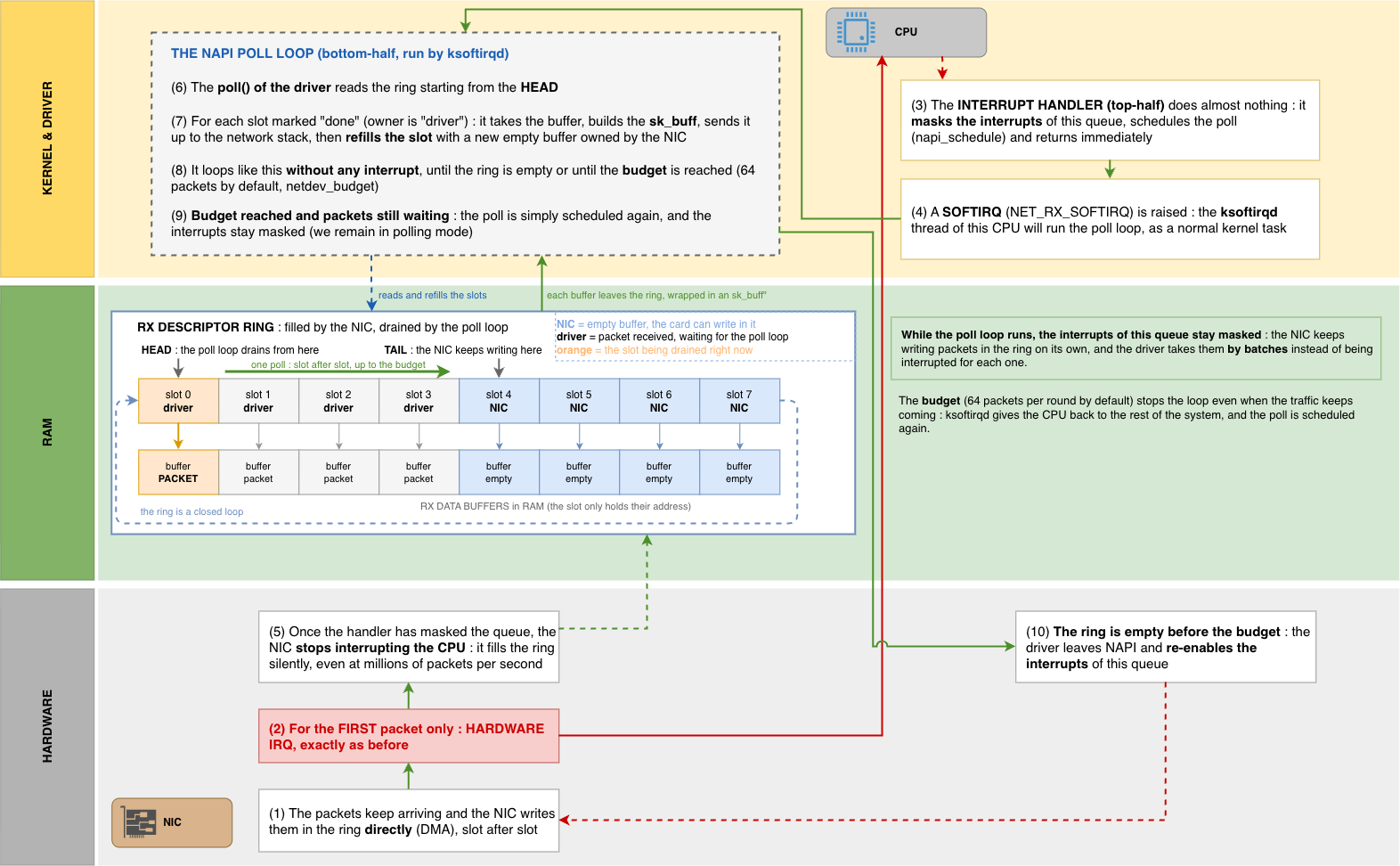
The trick is simple : the very first packet triggers a HardIRQ (hardware interrupt) as usual. But instead of really processing the packet immediately, the interrupt handler does two quick things :
- It disables further interrupts for that queue (we don’t want to be interrupted again for the next X packets)
- It schedules a SoftIRQ (a “software interrupt”, handled by a kernel thread called
ksoftirqd), and returns immediately
The SoftIRQ is a kind of “scheduled task” which is added to a wait queue so that the kernel treats it whenever it can, without immediately interrupting the running instructions as an HardIRQ does. When the SoftIRQ is handled, the kernel polls the RX ring buffer in a loop, getting as many packets as it can in one run (up to a configured limit, typically 64 packets per round), before re-enabling the hardware interrupts.
This is how the logic is improved : we switched from “interrupt per packet” to “interrupt to start a polling session”. At high packet rates, one hardware interrupt can handle thousands of packets. At low rates, we fall back to fast per-packet interrupts.
Remind this word : polling. We’ll see later that DPDK takes this exact idea and pushes it to further level.
Network stack : the price of the sk_buff
So the system, via any of the 2 methods (the “old” one or the “new” one using SoftIRQ) has the raw bytes of the packet stored in RAM, and the kernel has to process it.
For every single packet, the kernel allocates a metadata structure called an sk_buff (socket buffer, often written skb). This is the most important data structure of the Linux network stack. It holds pointers to the packet data, and every field the stack could possibly need : which interface it came in on, the L2/L3/L4 header offsets, checksums, the associated socket, timestamps, and so on.
The sk_buff is very powerful and required for “standard” use-cases, but it is also big and expensive to allocate and free for every packet. When you’re doing millions of packets per second, allocating and zeroing this structure, then walking it up through each protocol layer, becomes a very huge cost.
The packet then travels up the stack :
- L2 : the driver hands the
skbto the network stack, the Ethernet header is examined - L3 : IP layer –> routing decision, netfilter hooks (this is where
iptables/nftableshappens), defragmentation… - L4 : TCP/UDP –> find the matching socket, checksum validation, reordering, buffering
- Finally the payload is copied into the user-space buffer of the receiving application, when it calls
recv()
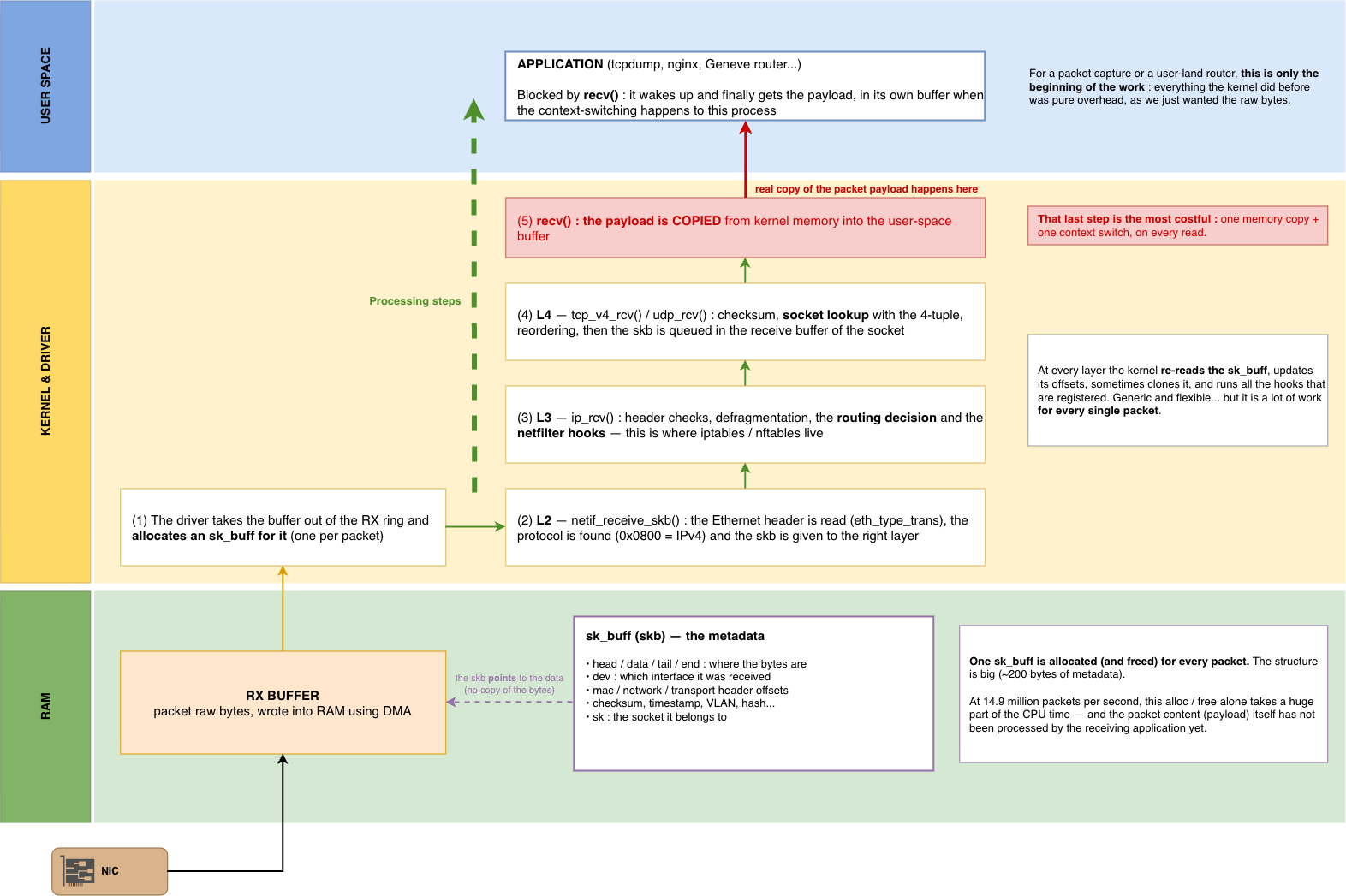
Focus on that last step : a copy from kernel space to user space. That’s a context switch and a memory copy, for every read. This is the main reason why processing network packets from user-land, going through the full system network stack, is so slow.
But what if I don’t actually want the packet to travel all the way up ? What if I only want to look at some packets, while dropping / ignoring most of them, as early and as cheaply as possible ?
That question is the reason why BPF exists.
BPF : Berkeley Packet Filter
Let’s go back to 1992. Two researchers at Berkeley, Steven McCanne and Van Jacobson, publish a paper : “The BSD Packet Filter : A New Architecture for User-level Packet Capture”. This is the birth of BPF (Berkeley Packet Filter).
The problem they were solving is the ancestor of ours. Tools like tcpdump need to capture packets. But you almost never want to capture ever* packet, you want “TCP traffic to port 443”, or “UDP on port 6081” (hello Geneve 👋). Taken as is, it can be brutal : copy every packet up to the user-space capture tool, and let this program throw away 99% of them. We have to pay the expensive hand-off to user space (memory copy + context switch) on a huge number of packets that we’re going to discard anyway (+ the compute this filtering will need once in user-space)
The BPF solution : push the filter down into the kernel, and run it before the expensive steps happens. Only packets that match this code-based filter are continuing the process.
But there’s a big warning. We can’t just let user space inject arbitrary code to run inside the kernel. That would be a critical security and stability risk (one bad pointer / memory access and the whole machine crashes). So BPF introduces a tiny, restricted virtual machine living in the kernel :
- A minimal instruction set (load, store, jump, arithmetic, return)
- A couple of registers and a small scratch memory
- No loops, no arbitrary memory access So a filter program is guaranteed to terminate and can’t “evade” into kernel memory space.
The user space program compiles a high-level filter expression into this bytecode, hands it to the kernel, and the kernel runs it on each packet.
Match –> the packet is copied up to the tool that installed the filter (ie : tcpdump).
No match –> nothing is copied. The kernel drops the packet for that consumer only : the tool (tcpdump) never sees it, and no copy nor context switch is paid for it. But the packet itself is untouched and keeps travelling normally up the stack to whatever application it was actually addressed to (if any).
BPF example : tcpdump
This isn’t an old, outdated technology : it’s running on your machine right now and you probably use it everyday as a network engineer. When you type a tcpdump filter, that human-readable string gets compiled to classic BPF (“cBPF”) bytecode. You can dump it with the -d flag (thank you Claude for helping me commenting it) :
$ tcpdump -d 'udp port 6081'
(000) ldh      [12]                        ; A = EtherType (offset 12 in the Ethernet header)
(001) jeq      #0x86dd      jt 2   jf 8    ; is it IPv6 (0x86dd) ? no --> go test IPv4 at (008)
(002) ldb      [20]                        ; IPv6 : A = Next Header (14 eth + 6)
(003) jeq      #0x11        jt 4   jf 19   ; is it UDP (0x11) ? no --> reject
(004) ldh      [54]                        ; IPv6 : A = UDP source port (14 eth + 40 IPv6)
(005) jeq      #0x17c1      jt 18  jf 6    ; src port == 6081 ? yes --> accept
(006) ldh      [56]                        ; IPv6 : A = UDP destination port
(007) jeq      #0x17c1      jt 18  jf 19   ; dst port == 6081 ? no --> reject
(008) jeq      #0x800       jt 9   jf 19   ; is it IPv4 (0x800) ? A still holds the EtherType
(009) ldb      [23]                        ; IPv4 : A = Protocol field (14 eth + 9)
(010) jeq      #0x11        jt 11  jf 19   ; is it UDP ? no --> reject
(011) ldh      [20]                        ; IPv4 : A = flags + fragment offset (14 eth + 6)
(012) jset     #0x1fff      jt 19  jf 13   ; fragment offset != 0 ? --> reject (no L4 header here)
(013) ldxb     4*([14]&0xf)                ; X = IHL * 4 = IPv4 header length in bytes
(014) ldh      [x + 14]                    ; IPv4 : A = UDP source port (14 eth + X)
(015) jeq      #0x17c1      jt 18  jf 16   ; src port == 6081 ? yes --> accept
(016) ldh      [x + 16]                    ; IPv4 : A = UDP destination port
(017) jeq      #0x17c1      jt 18  jf 19   ; dst port == 6081 ? no --> reject
(018) ret      #262144                     ; MATCH : copy up to 262144 bytes
(019) ret      #0                          ; NO MATCH : copy nothing
This is a complete program : it loads the EtherType, jumps depending on IPv4/IPv6, checks the protocol is UDP, skips fragments, walks past the variable-length IP header (4*([14]&0xf)), and finally compares both UDP ports against 0x17c1 (which is 6081 in hex).
Notice that the return value isn’t a boolean, it’s a number of bytes to copy (a snaplen). ret #262144 means “match : copy up to 262144 bytes of this packet into the capture buffer”, and ret #0 means “copy zero bytes”, which is exactly how “don’t capture this one” is expressed. Again : a packet that returns 0 is not removed from the machine. If it was a TCP 443 packet destined to your web server, the web server still receives it, completely unaffected. It is only absent from the capture (copy).
Here is how it’s applied : tcpdump opens an AF_PACKET socket and attaches the compiled bytecode to it with setsockopt(SO_ATTACH_FILTER). When a packet reaches the kernel’s capture hook point, the kernel hands a clone of it to that socket, runs the filter on the clone, and either copies it into the capture ring buffer or throws the clone away. The original packet continues its normal stack travel.
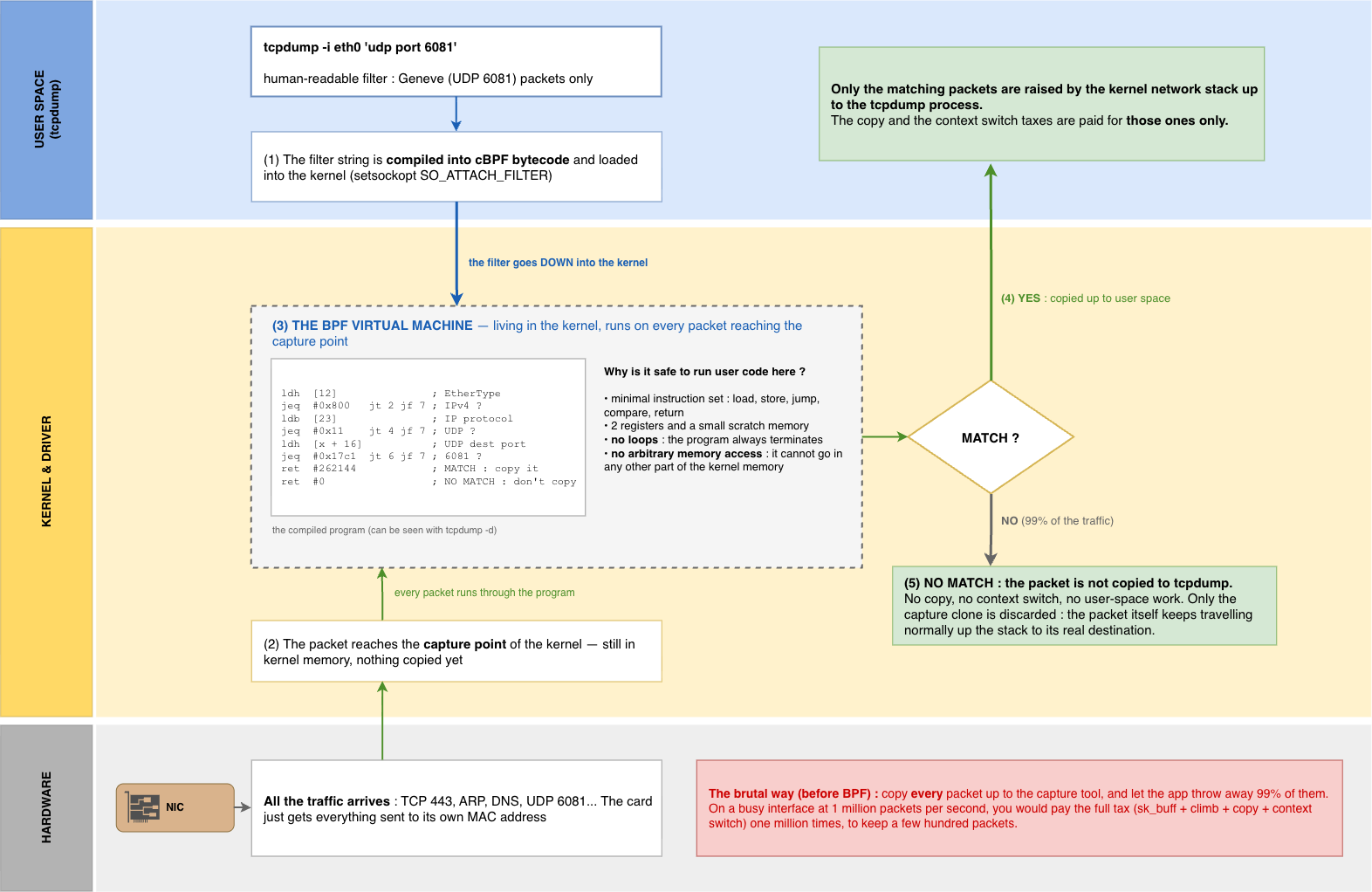
This filter still runs a bit late : the kernel has already paid the full receive cost for that packet. The HardIRQ, the SoftIRQ, the sk_buff allocation and the climb up the stack. None of that is avoided. What the filter effectively avoids, for the ~99% of packets that don’t match it, is everything that comes after the decision : copying the packet into the capture buffer, waking up tcpdump (context switch), and copying / parsing the bytes in user space. Those are by far the most expensive steps of a capture, which is why a filtered tcpdump can run on a very busy interface without collapsing the machine. What could be even better would be to filter the packets before the sk_buff is even built, and that’s exactly XDP’s job.
From BPF to eBPF
Classic BPF (cBPF) was great, but quite limited. It was only conceived for one job : filtering for capture. Its whole logic was “look at this packet, then copy it or drop it”. Two 32-bit registers, no real memory, no way to keep state between packets. But once the logic of running “user” code safely inside the kernel was introduced, the demand growed : what if I don’t just want to decide about what to do with a packet, but actually act on it (rewrite it, count it, redirect it, remember something about the flow it belongs to) ?
Around 2014, Alexei Starovoitov reworked it into eBPF (extended BPF), and that’s a big step forward. eBPF turns that little packet-filter VM into a general-purpose, in-kernel execution engine :
- 11 registers, 64-bit each, mapped closely to real hardware registers
- A JIT (Just-in-Time) compiler : the bytecode is translated to native machine code at runtime, so an eBPF program runs at full speed (no interpreted code)
- Maps : key/value data structures (hash maps, arrays, ring buffers…) that persist across invocations and are shared between the kernel program and user space. This is a huge point : it means that an eBPF program can keep state (counters, flow tables, config) and talk to a user-space control plane. Remember our Geneve router’s flow-cookie table ? That’s exactly what a map is built for
- Helper functions : a controlled API the program can call into (get the current time, look up a route, redirect a packet, adjust headers…)
- The Verifier : before any eBPF program is allowed to load, the kernel statically analyzes every possible execution path to validate it’s safe (properly terminates, never reads uninitialized memory, never dereferences an out-of-bounds pointer, …). If the verifier doesn’t consider it 100% safe, the eBPF program is rejected. This is what makes the kernel able to run “user-provided” code safely
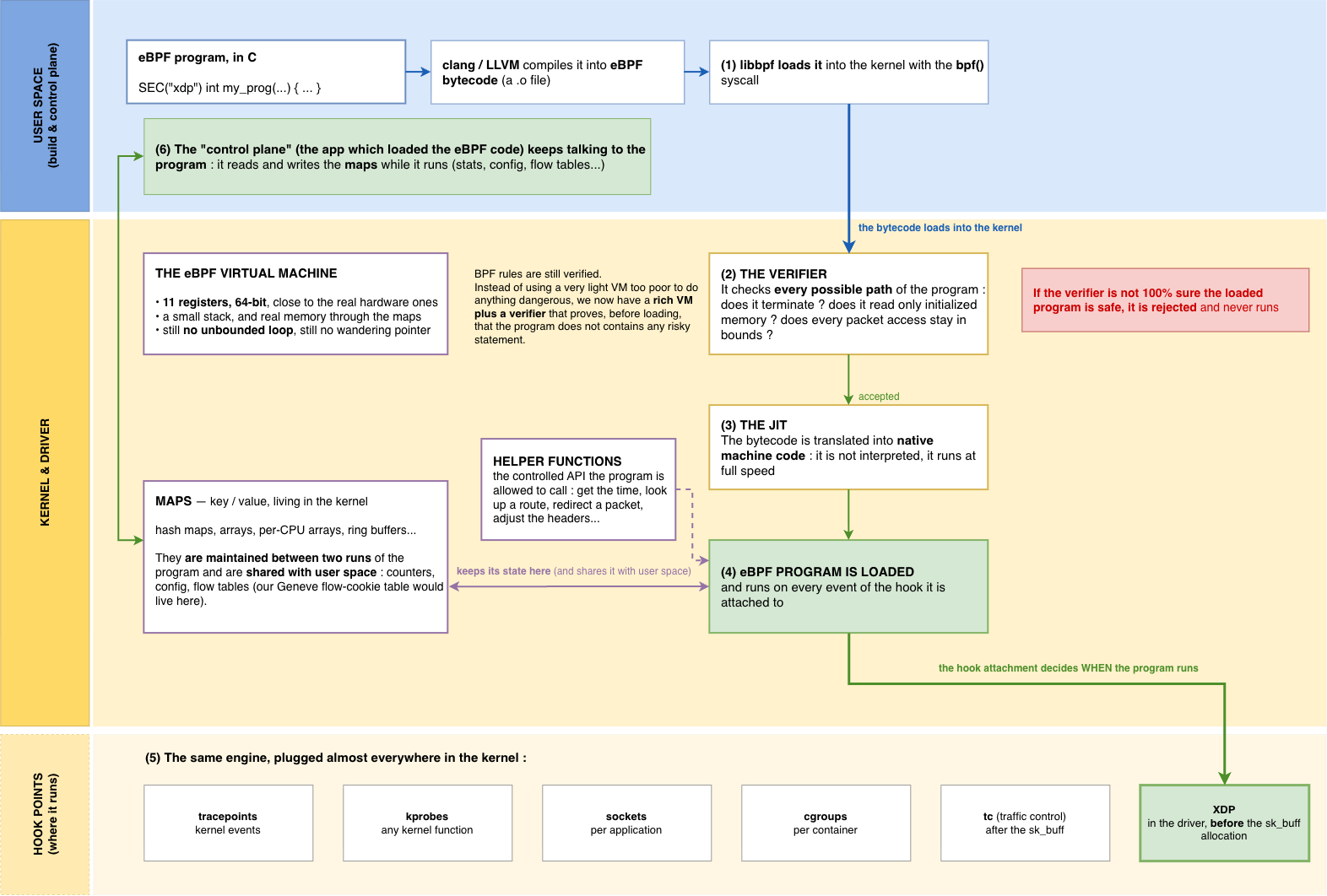
eBPF programs can now attach to dozens of hook points (tracepoints, kprobes, sockets, cgroups, the traffic-control (tc) layer… and, the one we care about most here, the XDP hook, that we are going to talk right after).
Indeed, there’s an important hook point for networking specifically. A safe, fast, in-kernel VM is nice. But if you attach it in the middle of the kernel’s network stack, you’ve already paid for the HardIRQ, the SoftIRQ, the sk_buff allocation, and part of the protocol stack climb before the eBPF code even runs. The real goal is to run that eBPF code as early as physically possible : before the sk_buff allocation, before the stack climb, while the packet is still raw bytes in the driver Rx ring buffer in memory. That’s exactly what XDP, our next topic, does.
XDP : eBPF before the sk_buff allocation
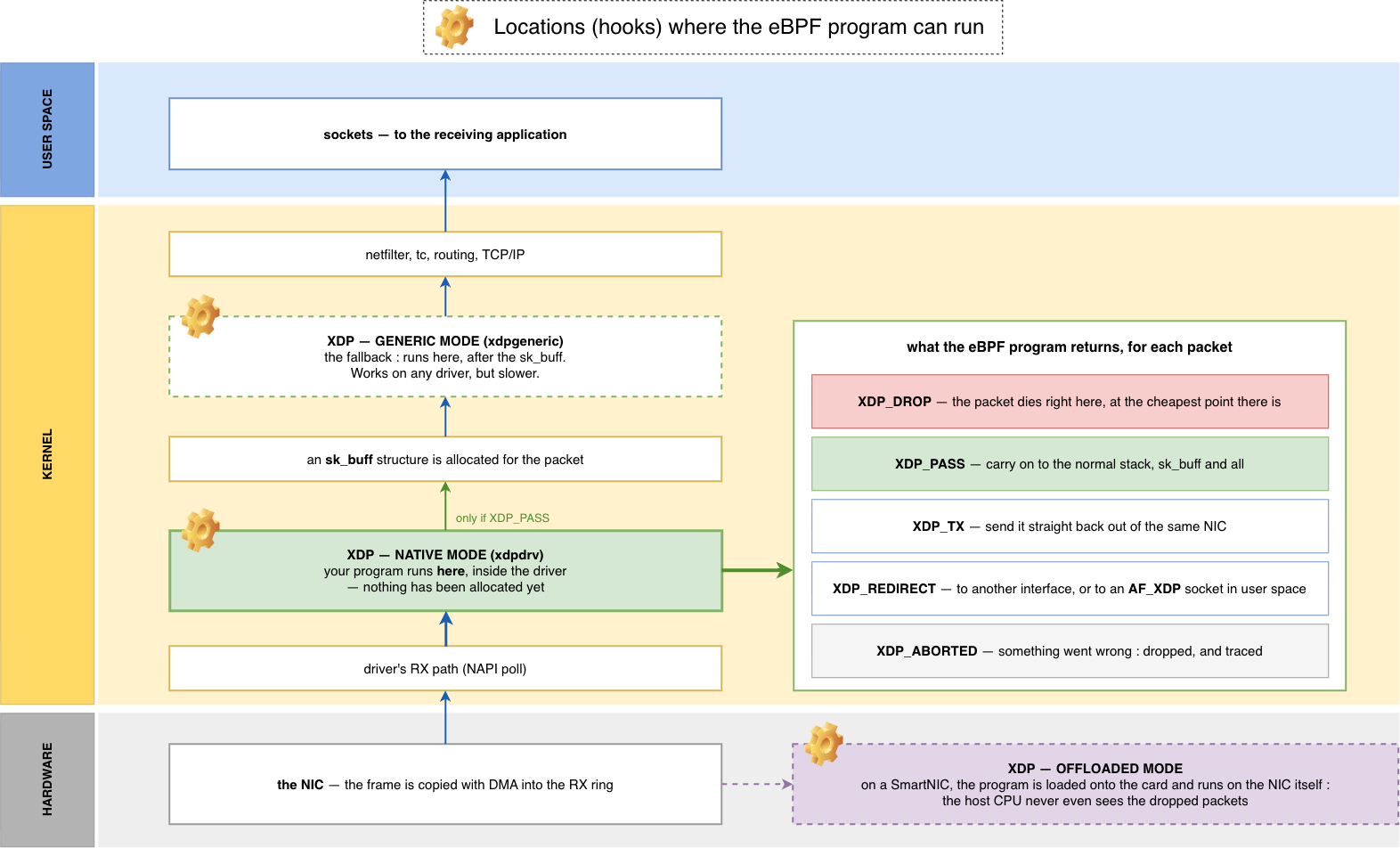
Remind the network stack climb : HardIRQ → SoftIRQ → allocate sk_buff → L2 → L3 → L4 → copy to user space. XDP (eXpress Data Path) lets you run an eBPF program even before the sk_buff is allocated, directly in the driver’s receive path, the instant the SoftIRQ pulls the packet out of the RX ring, when the packet is still just raw bytes.
Talking again about hook points, this one is the earlier one we can catch a packet. No sk_buff allocation yet, no protocol stack climb, no copy. You get a pointer to the raw packet data and you decide, in compiled code, what to do with it. The eBPF program only has to return one of the possible defined options :
XDP_DROP–> discard the packet immediately. This is why XDP is the best choice for DDoS mitigation : you can drop tens of millions of packets per second per core, because a dropped packet never triggers ansk_buffor a single cycle of stack processingXDP_PASS–> let it continue up the normal stack as usual (the kernel builds thesk_buffand process the packet as we detailed above)XDP_TX–> return the packet back to the same interface it came in onXDP_REDIRECT–> send it out a different interface, or up to a special user-space socket (AF_XDP), we’ll discuss it laterXDP_ABORTED–> something went wrong (shows up as a tracepoint you can monitor)
The absolute minimal XDP program (which loads, but which does nothing else special other than letting the kernel process the packet normally) looks like this :
#include <linux/bpf.h>
#include <bpf/bpf_helpers.h>

SEC("xdp")
int xdp_pass(struct xdp_md *ctx)
{
    return XDP_PASS;
}
The struct xdp_md *ctx gives us two pointers, ctx->data and ctx->data_end, which are the start and the end of the raw packet in-memory. This is also where the verifier is strict : every read into the packet has to be checked against data_end before doing it, otherwise the program will simply not load. Let’s take a more useful example, which counts and drops all the UDP packets going to the UDP port 6081 :
SEC("xdp")
int xdp_geneve_drop(struct xdp_md *ctx)
{
    void *data     = (void *)(long)ctx->data;
    void *data_end = (void *)(long)ctx->data_end;

    struct ethhdr *eth = data;
    if ((void *)(eth + 1) > data_end)          // bounds check — mandatory !
        return XDP_PASS;
    if (eth->h_proto != bpf_htons(ETH_P_IP))
        return XDP_PASS;

    struct iphdr *ip = (void *)(eth + 1);
    if ((void *)(ip + 1) > data_end)           // bounds check again
        return XDP_PASS;
    if (ip->protocol != IPPROTO_UDP)
        return XDP_PASS;

    struct udphdr *udp = (void *)ip + ip->ihl * 4;
    if ((void *)(udp + 1) > data_end)          // and again
        return XDP_PASS;

    if (udp->dest == bpf_htons(6081))
        return XDP_DROP;

    return XDP_PASS;
}
Notice the three explicit bounds checks. For a “standard” C program, the system guardrails would prevent any read / write on a memory page your program don’t own. But here, this check is the condition for being “approved” by the verifier, and running inside the kernel’s fast path.
For ultimate performance, some drivers even support XDP in “native” mode (running in the driver itself) versus “generic” mode (a fallback that runs a bit later, after the sk_buff is built — slower, but works everywhere). There’s even an “offloaded” mode, where the eBPF program is loaded onto a SmartNIC and runs on the NIC hardware itself, so the host CPU never even sees the manipulated / dropped packets.
Real-world example
All of this seems great in theory, but how do we run this program on a real machine ? On a Debian / Ubuntu system :
apt install -y clang llvm libbpf-dev linux-headers-$(uname -r) linux-tools-$(uname -r)
Then we compile our C file. eBPF is a compilation target like any other CPU architecture, so we just ask clang for it :
clang -O2 -g -target bpf -c xdp_geneve.c -o xdp_geneve.o
What we get is a plain ELF object file, in which our function sits in a section called xdp.
Now we attach it to an interface. This is the moment where the kernel runs the verifier :
ip link set dev eth0 xdp obj xdp_geneve.o section xdp
If the verifier is not happy (try to remove one of the three bounds checks to see it), the program is simply refused, and we get something like this :
libbpf: prog 'xdp_geneve_drop': BPF program load failed: Permission denied
libbpf: prog 'xdp_geneve_drop': -- BEGIN PROG LOAD LOG --
  invalid access to packet, off=14 size=20, R2(id=0,off=14,r=14)
  R2 offset is outside of the packet
Regarding the modes we talked about just before : xdp (or xdpdrv) asks for the native mode, and the command will fail if the driver doesn’t implement it. In that case we fall back to the generic mode, slower but available everywhere :
ip link set dev eth0 xdpgeneric obj xdp_geneve.o section xdp
To check that our program is really attached, a simple ip link gives us the information :
ip link show dev eth0
2: eth0: <BROADCAST,MULTICAST,UP,LOWER_UP> mtu 9001 xdp qdisc mq state UP mode DEFAULT group default qlen 1000
    link/ether 00:02:b3:a2:7b:44 brd ff:ff:ff:ff:ff:ff
    prog/xdp id 42 tag a04f5eef06a7f555 jited
The jited at the end is the confirmation : our bytecode has been compiled to native instructions, as we described above.
And to remove it :
ip link set dev eth0 xdp off
bpftool : list loaded eBPF programs
The tool for everything eBPF is bpftool (it comes with the linux-tools package). Listing every program currently loaded in the kernel is just :
bpftool prog show
14: cgroup_skb  name sd_fw_egress  tag 6deef7357e7b4530  gpl
    loaded_at 2026-08-17T09:12:41+0000  uid 0
    xlated 64B  jited 54B  memlock 4096B
42: xdp  name xdp_geneve_drop  tag a04f5eef06a7f555  gpl
    loaded_at 2026-08-17T14:03:07+0000  uid 0
    xlated 296B  jited 174B  memlock 4096B  map_ids 12
    btf_id 51
Note that a fresh system is never empty : systemd alone loads a bunch of cgroup_skb programs. Our program is the id 42, the same id that ip link was showing.
From there we can dig into a specific program :
bpftool prog show id 42 --pretty      # all the details, in JSON
bpftool prog dump xlated id 42        # the bytecode, as the verifier rewrote it
bpftool prog dump jited id 42         # the native instructions really executed
To get detailed information (which program is attached to which interface and which hook) we use :
bpftool net show
xdp:
eth0(2) driver id 42

tc:

flow_dissector:
And if the program uses maps (our counters, a flow table, some configuration…), we can read them live from user space, without touching the program :
bpftool map show
bpftool map dump id 12
12: percpu_array  name pkt_count  flags 0x0
    key 4B  value 8B  max_entries 1  memlock 4096B

key: 00 00 00 00
value (CPU 00): 39 4c 12 00 00 00 00 00
value (CPU 01): 00 00 00 00 00 00 00 00
Last useful trick when developing : a bpf_printk("...") in the eBPF code writes into the kernel trace buffer, that we simply read with :
cat /sys/kernel/debug/tracing/trace_pipe
What if I really need user-space ?
XDP is a great option when your logic can live inside the kernel as an eBPF program. And when it does, the results are impressive, with globally reports of around 15 Mpps (Millions of packets / second) per core, which is what we need for the smallest possible frames on a 10Gbps interface. This is not a lab technology, it is running today on some of the biggest networks in the world :
- Cloudflare drops its DDoS attacks with XDP (their L4Drop system), directly in the driver, on every edge server. They also built Unimog, their own layer-4 load balancer, on top of XDP
- Meta open-sourced Katran, the XDP-based layer-4 load balancer through which you access their services
- Cilium uses it for Kubernetes
- On the observability and security side,
bccandbpftracelet you trace what the kernel does live (using different hook points), and tools like Falco or Tetragon detect suspicious behaviour on a host with eBPF probes instead of a kernel module
But XDP also has limits : the verifier is strict, you can’t call any libraries you want, complex stateful logic can be difficult to manage, and if your ultimate goal is a big user-space application (a full firewall engine, a router of whatever), you still eventually have to get the packets… into user space where your program will not have those limits anymore.
Over the last few years, the whole networking industry moved to NFV (Network Functions Virtualization) : the firewalls, routers, load-balancers and various boxes that used to be dedicated hardware appliances were rewritten as software running on ordinary servers and, above all, on cloud VMs. A “virtual firewall”, a 5G user-plane function, or exactly the kind of GWLB inspection appliance as my Python Geneve router was an example. Those are big user-space programs that have to process traffic at line rate. This is precisely what the standard kernel path can never provide, because of the sk_buff allocation and copy tasks we discussed above in this article.
Now, almost every appliance that used to be a physical pizza box in a rack now exists as a VM image, and most of them have a DPDK data plane under the hood :
- Palo Alto VM-Series, Fortinet FortiGate-VM, Check Point CloudGuard –> the virtual versions of the firewalls we all know, are all documented as using DPDK to reach the needed throughputs
- Juniper vMX and vSRX, or the Juniper Contrail vRouter in DPDK mode : a router / firewall forwarding plane, running as a process on a server
- F5 BIG-IP VE, and most virtual load balancers
- On the open source side, Open vSwitch can run with a DPDK data path (OVS-DPDK), and VPP (Vector Packet Processing, from the FD.io project, originally a Cisco technology) is a complete network stack in user space, used as the base of many commercial products
- In the telco world, the 5G UPF (User Plane Function) –> the element that forwards all the traffic of the mobile subscribers, is generally a DPDK application running on standard servers
So how do you process network packets with a user-space program at 10/40/100 Gbps without being impacted by the kernel network stack ? Two soutions emerged : an “intermediate” one that still stays inside the kernel’s stack, and a radical one that throws the kernel out of the data path entirely.
AF_XDP : the intermediate way
eBPF/XDP allows returning the XDP_REDIRECT option, pointing to an AF_XDP socket. This gives user space a shared-memory space into which the driver drops raw packet bytes, bypassing the whole stack while still living within the kernel’s driver framework. The kernel’s driver is still in the loop, providing its safety, but the user-space app reads packets almost as fast as if it directly owned the NIC.
That’s a way to go, but it’s only used by a few products, generally for inspection (ie : Suricata). But the best solution, which allows most of the virtual network appliances to really run at linecard-rate, is DPDK.
DPDK : removing the kernel
DPDK (Data Plane Development Kit) was invented by Intel around 2010 and takes a completely different approah. XDP proposed a way to hook into the kernel path, as early as possible. DPDK offers a way to completely get rid of the kernel path, as this stack is the real performance problem. This is a complete kernel bypass.
Here’s how DPDK handles the problem :
- Detach the NIC from the kernel –> The network interface is bound to a special userspace-IO driver (
vfio-pci/uio). The kernel now sees… nothing on that NIC. The DPDK application “owns” the hardware link directly and maps the NIC registers and ring buffers directly into its own process memory - Poll instead of interrupt (PMD) –> Remember I told you to keep in mind the word polling ? DPDK uses Poll Mode Drivers : instead of waiting for an interrupt, a CPU core runs an infinite loop, continuously asking the NIC if any packet was received. At high load, interrupts becomes pure overhead as they happen constantly, so polling wins. But there’s a huge price to pay for that : that core runs at 100% load, permanently, even when the network is idle. Selected cores are entirely dedicated to packet processing. There’s a small workaround to this issue, that we’ll cover later
- Hugepages –> DPDK allocates its packet buffers from hugepages (2MB or 1GB pages instead of the usual 4KB used by most systems). Fewer, bigger pages mean far fewer TLB misses (TLB = Translation Lookaside Buffer) when the CPU translates virtual to physical addresses, which makes a huge difference when running at these speeds
- Zero-copy –> Packets are DMA-copied by the NIC directly into hugepage buffers the application already owns. There is no copy to user space, because there is no “kernel space” to cross anymore
- Batching –> Everything is processed in bursts of packets
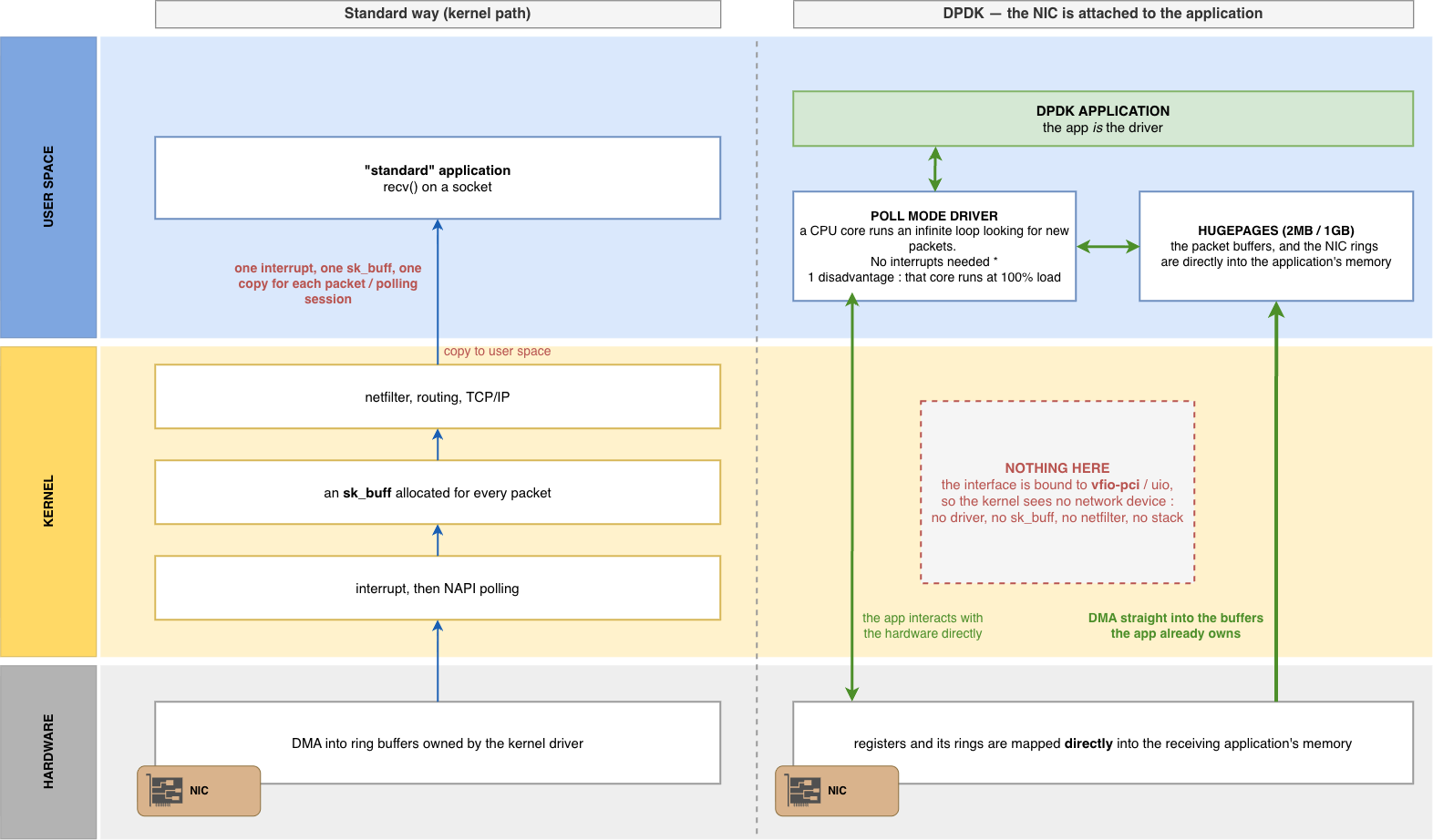
The result is impressive. Tens of millions of packets per second per core, with ultra-low latency. This is why DPDK became the basis of almost all Virtual Network Function (VNF) solutions. Open vSwitch, VPP (Vector Packet Processing), and most commercial virtual appliances all runs on a DPDK data path.
DPDK on a cloud VM ?
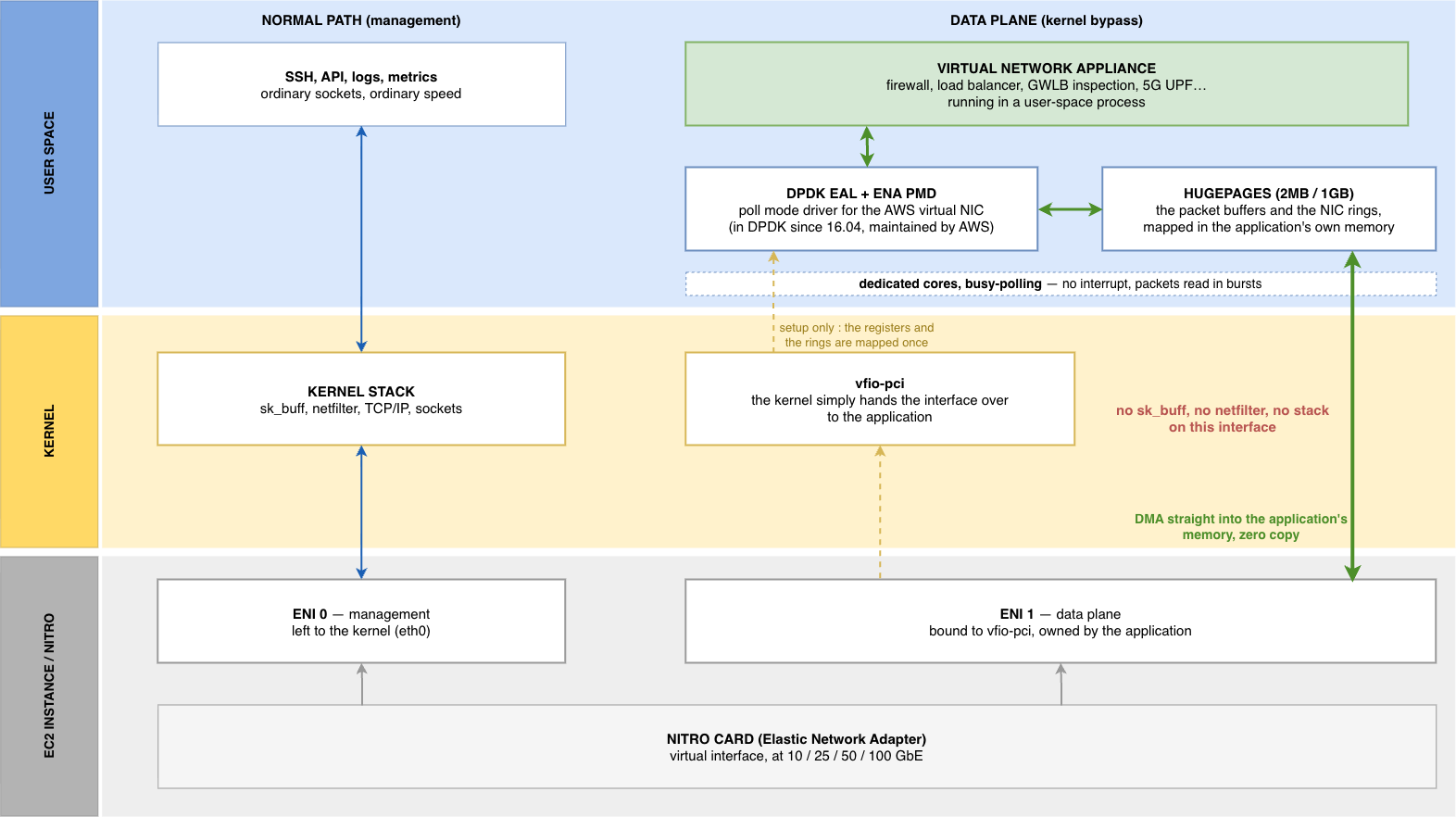
All of this logic of binding the NIC to a userspace process sounds like something you can do on a bare-metal server. On a cloud VM you don’t have a physical NIC : you have a virtual network interface presented by the hypervisor. So is DPDK working in such a case ?
Hopefully, the answer is YES, and this is what makes cloud-appliance actually work. The cloud vendors ship DPDK poll-mode drivers for their virtual NICs. On AWS, the Elastic Network Adapter (ENA) (the interface behind every Nitro instance (C5, M5, etc)) has an official ENA PMD in DPDK since version 16.04. It is link-speed agnostic (the same driver drives a 10, 25, 40 or 100 GbE ENA), and Amazon maintains it directly. Bind your ENI to vfio-pci, allocate hugepages, and your DPDK appliance runs at line rate, no special hardware required.
The DPDK infinite loop workaround
The “scary part” of DPDK is that pinned core running at 100% load even when no traffic is received. On a bare-metal (physical) box dedicated to forwarding, this is “just” a power-consumption / cooling problem. On a cloud VM you’re paying for a core that runs at full load uselessly even when the link is idle is a real problem, so DPDK was enforced with a workaround.
And guess what ? It’s based on… HardIRQ (Hardware Interrupts). The trick is to bring them back, but now in reverse : DPDK supports an RX interrupt mode : when no packets are received after a certain amount of pollings, the core arms a one-shot RX interrupt and goes to sleep, exactly as the classic “raise and HardIRQ when a packet is received” model from the beginning of this article. As soon as a new packet is received, the interrupt is triggered, the core wakes up again and goes back into the infinite polling loop as long as traffic keeps being received.
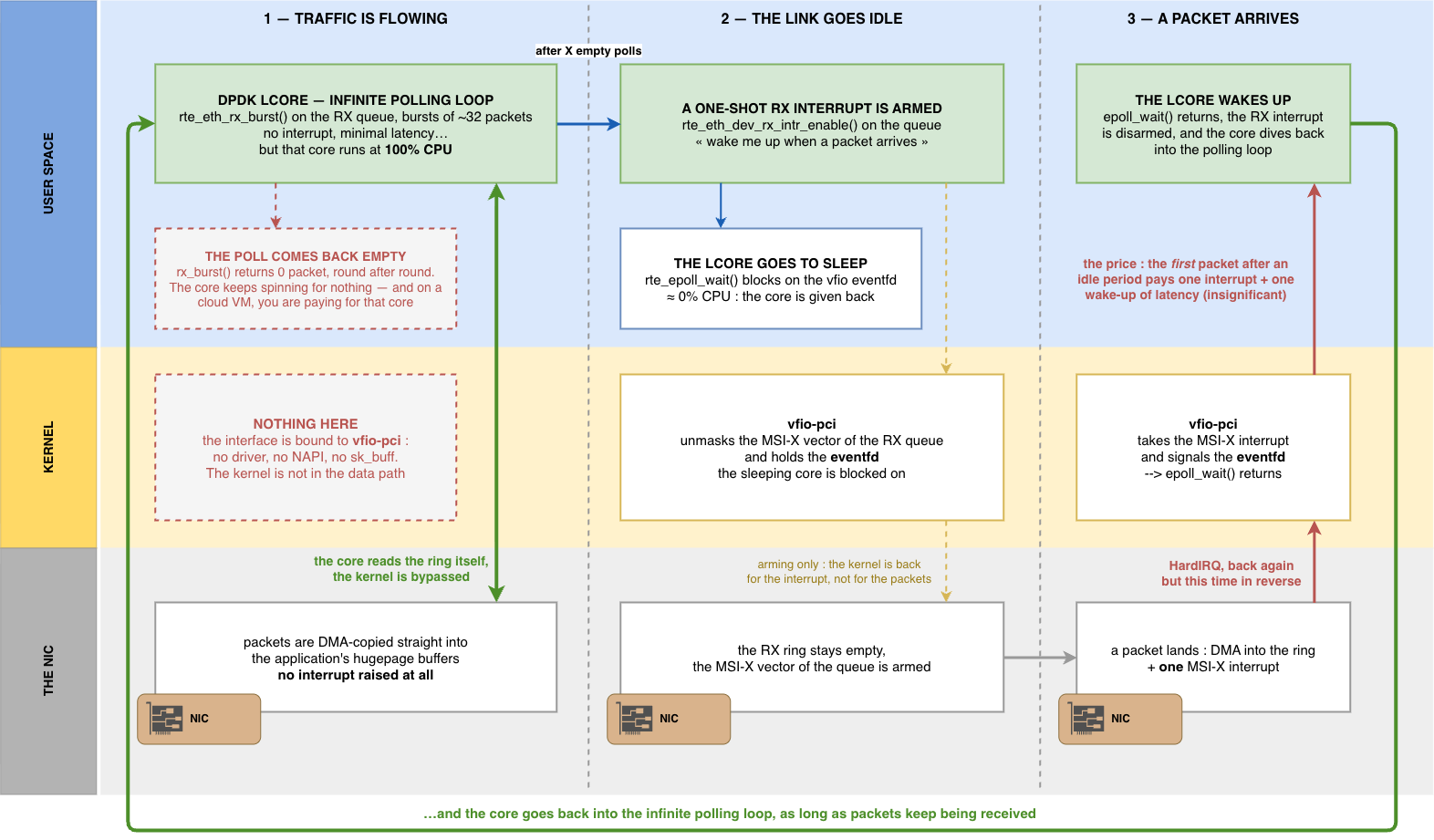
That’s incredibly powerfull, but that’s a design choice : even with this interrupt mode, you have to dedicate cores to packet processing, you lose the entire kernel toolbox (no built-in tcpdump, no iptables, no routing table, no sockets on that NIC… you have to reimplement everything on your own), and it’s really, really, REALLY harder to develop and troubleshoot.
Which solution is the best ?
The answer mainly depends on what you want to achieve :
XDP/eBPF : when you want to act on received packets early, while staying inside the kernel stack : dropping DDoS floods, simple/stateless (or lightly stateful, via maps) forwarding and load-balancing, observability. You keep the kernel, its stability, and its whole set of tools. You add your code to a running system without dedicating cores to it
DPDK : when you’re building a heavy, user-space, specific packet-processing virtual appliance that will very likely saturate the NIC and where you have no problem of dedicating CPU cores –> a virtual firewall, a 5G data plane function, a software router running at line rate, and encryption appliance… You want total control and maximum throughput, and you accept paying the price of code complexity, and dedicated CPU cores
Back to my Geneve router
As explained at the beginning of this article, what brought me to this (long !) path was my Python Geneve router, which is a perfect illustration.
Every Geneve packet from the GWLB took the full network stack journey : HardIRQ, SoftIRQ, sk_buff allocation, up through L2/L3/L4, a copy into our raw socket’s user-space buffer, then the Python interpreter, parsing the headers, swaps IP addresses, and sends the packet back down the whole stack again. Every one of those steps is a slice of the “cost”. At a few thousand packets per second on a lab, that’s fine. At line rate, it simply cannot work.
Now, let’s imagine the eBPF/XDP version. The moment a Geneve packet lands in the driver’s RX ring :
- The XDP program reads the outer UDP header right there, in the DMA buffer. No
sk_buffallocated, no bytes copied. Is the destination port6081? If not,XDP_PASSto send it to the “normal” network stack and forget about it - If yes, read the Geneve options to find the flow-cookie, and look the flow up in a BPF map (our flow table, now living in the kernel and shared with a small user-space control plane for logging/config)
- Apply the policy : drop non-SYN unknown TCP flows (
XDP_DROP), or for the traffic we want to send back, rewrite the outer IP header in place and return it out the same interface withXDP_TX—-> the packet never leaves the driver, never goes through the kernel network stack, and never gets copied to user space
Same tool, moved from “all the way up to Python and back down” to a high-speed running bit of code directly in the kernel, as close as possible from the NIC.
Rewriting it to and eBPF code would be a big amount of work (bounds checks, passing the verifier’s validation, headers rewriting for IP swaps, stateful logic with AWS flow-cookies)…
But who knows, it could be the part 2 of this article… STAY TUNED !